How AI agents make decisions and take action (2026 update)

At the 2024 seminar on how AI agents could change the future, Andrew Ng discussed why agents matter. An agent can break a task into steps, use tools, inspect the results and adjust what it does next. To understand how this differs from a single question-and-answer exchange, we first need to look at where the idea came from.
Where AI agents come from
One useful starting point is AI pioneer Marvin Minsky and his 1980s book The Society of Mind. He described intelligence as a society of smaller agents, each contributing a particular skill to a complex task. This helps explain division of labor; a modern agent does not necessarily require several models working together.
Think about making breakfast. A timekeeper reminds you when to leave, a cook considers how long to toast the bread, and a nutritionist suggests what to eat with it. Large language models, or LLMs, provide a technical basis for understanding tasks in natural language, planning steps and selecting tools.
In Andrew Ng’s explanation of agentic workflows, asking a model to write an entire article in one pass resembles asking an author to produce a finished piece without using backspace. Another workflow lets it outline, research, draft and revise. This comparison concerns the workflow. It does not mean an LLM can only answer once; “zero-shot” means that the prompt contains no demonstrations.
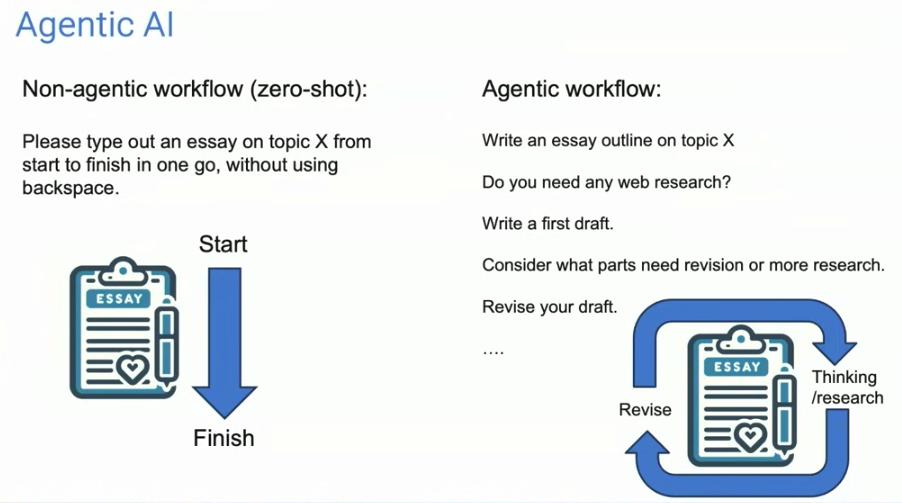
An agent’s iterative workflow also recalls Minsky’s division of labor. During a writing task, it can plan an outline, decide what needs research, produce a draft and then review it. The work resembles a team moving between planning, questions, research and corrections, even when one underlying model performs several roles.
Repeated inspection and revision can be useful for complex knowledge work. The benefit depends on whether each pass finds and fixes actual problems: repeating a step without useful feedback does not by itself make the result better.
The central idea is straightforward: an AI agent enables AI to make decisions and put them into action.
The three core systems of an AI agent
Three systems help explain how an agent turns an instruction into work.
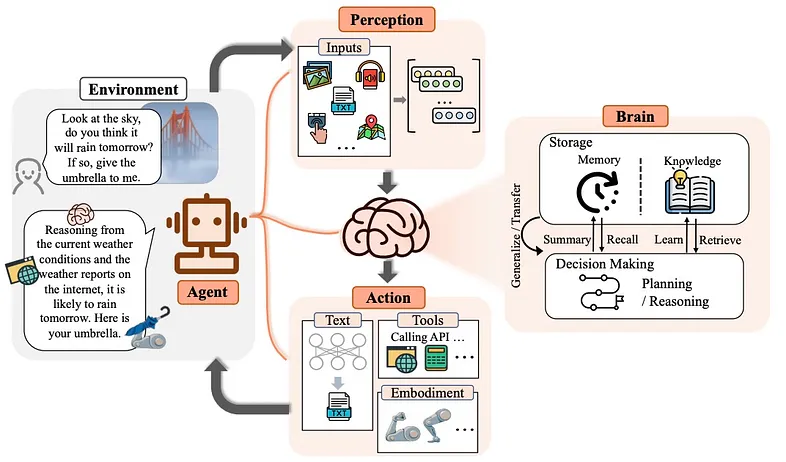
1. Perception
Like human senses, this system receives and processes inputs such as text, images and audio.
2. Reasoning and planning
This is the agent’s decision center. It holds or retrieves knowledge, analyzes information and plans what to do. An LLM can provide the language understanding and reasoning used here.
3. Action
The action system turns decisions into operations: calling an API, using a tool or controlling a physical device.
With these components in place, we can follow how an agent handles a task from beginning to end.
How an AI agent works
An agent’s workflow can be understood as a cycle of observing, deciding, acting and checking. Like a professional receiving an assignment, it first needs to understand the objective and then choose its next step based on what actually happens.
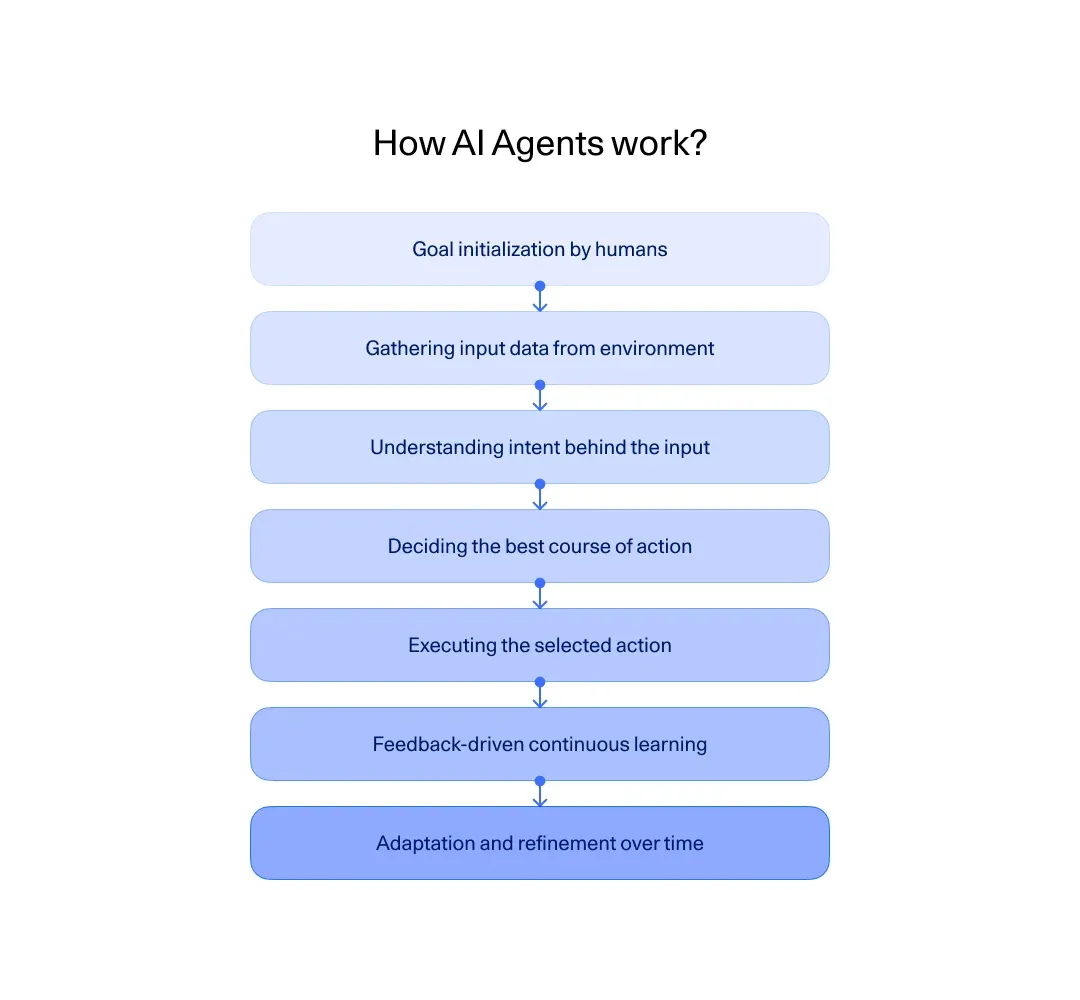
1. Initialize the goal
A user or engineer defines the task, which might involve customer support or logistics scheduling. The objective also needs a completion condition. “Find three feasible time slots and provide the sources” gives the system and reviewer something concrete to check.
2. Observe the environment
The agent collects relevant information, including website interactions, questions and system problem reports. The quality of these inputs affects everything that follows.
3. Process the data
Natural language processing helps turn raw inputs into a form the system can work with. It analyzes relationships in the data and interprets what the user is asking.
4. Make a decision
The system uses available experience and configured rules to choose a course of action. As in a board game, it may consider several moves ahead and revise the plan when conditions change.
5. Take action
The agent carries out the chosen step, such as answering a customer or changing a setting. Tool permissions, missing information and system limits matter here. A failed login or an action outside its authority should lead to a report or a request for confirmation.
6. Record feedback
The agent records whether an action succeeded. If a tool reports that an attachment cannot be opened, that result should inform the next attempt to obtain the file or ask the user for help. Retaining that experience for another task requires a memory or logging mechanism.
7. Adapt and improve
Feedback can change the next step. If a user corrects the columns in a report, the agent can use the corrected format later in the task. Improvement across tasks requires saved settings, evaluation results or separate training. Completing a task does not automatically update the model’s parameters.
These steps can be organized into different working arrangements.
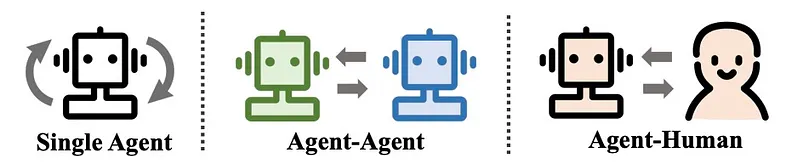
A single specialist
Like a market analyst, one agent focuses on a particular area and produces specialized advice.
A team of agents
Like a development team with designers, programmers and testers, several agents divide the work and coordinate to complete a larger project.
Human–AI collaboration
AI handles computation while people supply professional judgment. In healthcare, for example, AI may analyze records and test results, while a doctor makes the treatment decision.
How agents make decisions
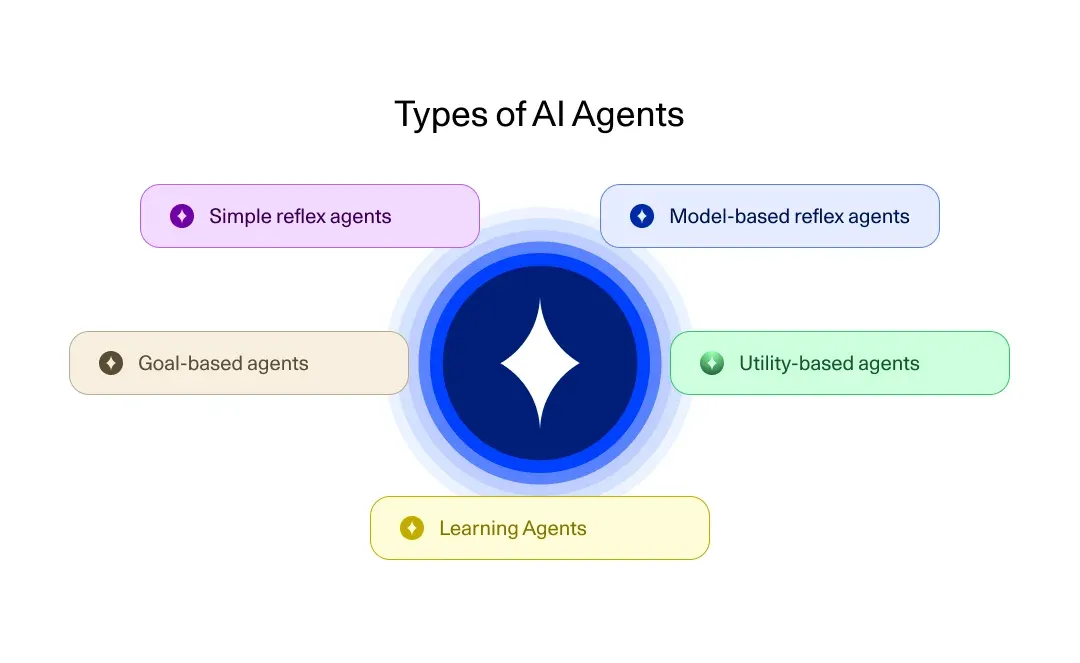
The following categories describe different decision mechanisms. They can coexist in one system; they are not five levels that every product must progress through.
Reflex responses
An automatic door is a familiar example. A sensor detects someone approaching and the door opens. This simple stimulus-and-response pattern is a starting point for understanding agent decisions.
Decisions based on the environment
A smart air conditioner may consider more than temperature alone:
Indoor temperature and humidity.
Changes in the number of occupants.
Outdoor weather.
The user’s preferences.
Combining these factors makes the decision more sensitive to the situation.
Planning toward a goal
An agent can plan a sequence of actions to reach a defined outcome. A travel-planning agent, for instance, might consider transport, weather forecasts and opening hours when arranging an itinerary.
Weighing competing objectives
A more involved decision balances several goals. A financial agent, for example, could consider more than the highest return:
Investment risk.
Liquidity needs.
The investment horizon.
Market volatility.
The design challenge is to evaluate these constraints together. A qualified professional still needs to review whether financial advice is suitable. Considering more factors does not guarantee returns or prevent losses.
Learning from feedback
A system may improve later decisions by updating memory, changing rules, revising prompts or collecting data for separate model training. These approaches have different costs and risks. Check what a product actually does instead of assuming that remembering a preference means retraining its model after every conversation.
These decision mechanisms help explain possible uses in manufacturing, healthcare and finance. Results depend on the data, tools and human review built around them.
Where AI agents can be used
Manufacturing
In a factory, potential applications include:
Real-time quality inspection using vision systems to detect small defects on a production line.
Predictive maintenance based on equipment operating data.
Production optimization through adjustments to process parameters.
Siemens discusses AI agents in the context of industrial assistants. A deployment should evaluate vision accuracy, equipment predictions and agent orchestration separately. The ability to recommend a change also does not automatically justify permission to modify production equipment.
Healthcare
Possible roles in healthcare include:
Medical image analysis to assist clinicians with diagnosis.
Disease-risk assessment using a patient’s historical data.
Data support for drug discovery and development.
Financial services
An agent can support ongoing market monitoring and personalized financial work. Its usefulness depends on which decisions it assists and how those decisions are checked.
For risk monitoring, a system can inspect transaction timing, amounts and frequency, flag unusual activity and hand the relevant records to an investigator. An anomaly alert is a starting point for review. Determining whether fraud occurred and deciding what to do require further investigation.
For investment research, an agent can combine market data, news and social discussion to support analysis. This brings more information into the decision process without removing the need to assess the quality and relevance of each source.
Personal finance applications may take account of income, risk tolerance, financial goals and everyday needs when preparing a plan. These inputs help tailor the work to an individual’s circumstances.
The challenges of deploying AI agents
Moving from a useful demonstration to dependable work raises several practical questions.
Computing requirements and reliability
Complex tasks need computing resources, particularly when a workflow processes text, images and audio together.
Accuracy and reliability also need deliberate evaluation. Agents can produce incorrect content or take an unsuitable next step. In healthcare and financial decisions, supervision and verification are especially important because an error can have consequences beyond the generated text.
Data security and privacy
As agents handle more personal information, security and privacy become part of the workflow design. Giving an assistant sensitive information requires controls against disclosure and misuse, particularly for medical and financial records.
How enterprise agent platforms developed in 2026
During 2025 and 2026, OpenAI, Anthropic and Google brought agent capabilities into work products and enterprise platforms. Tool use, coordination, feedback and permissions became product settings that organizations could evaluate. First establish whether a platform addresses enterprise deployment, data connections or cooperation between agents.
OpenAI Operator and Frontier
OpenAI introduced Operator in January 2025 to let an agent operate websites through a browser. ChatGPT agent integrated these capabilities in July of that year. Frontier, introduced in February 2026, focuses on building, deploying and managing enterprise agents, including work context across systems, identity, permissions and feedback. OpenAI names Uber, State Farm and Intuit among early adopters, and works with consulting firms through Frontier Alliance Partners.
Anthropic MCP and Claude Cowork
The open Model Context Protocol, or MCP, provides a way for AI applications to connect to external data and tools. Anthropic donated it to the Linux Foundation’s Agentic AI Foundation in December 2025. A common connection protocol does not replace an organization’s data-access controls. Claude Cowork brought file handling and multistep work to everyday users. The official site now describes these capabilities as integrated into Claude, which uses files, tools and the browser as the task requires.
Multi-agent frameworks and Google Gemini Enterprise
Google’s Gemini Enterprise Agent Ready, or GEAR, is a learning program for agent building and deployment. The Gemini Enterprise Agent Gallery serves a different purpose: finding, running and managing prebuilt or custom agents. Developers can also use AutoGen, CrewAI and LangGraph to divide retrieval, writing and verification work. For coordination across systems, A2A, or Agent2Agent, addresses agent-to-agent communication, while MCP addresses connections to tools and data.
Google Labs’ Opal was an experiment in building multistep mini-apps with natural language. According to Google’s official FAQ, Opal closed on November 17, 2026. Existing prompts remain in Google Drive; moving a workflow to Gemini skills requires reorganizing the instructions.
Which personal AI assistants can you use in 2026?
Enterprise platforms place agents inside organizational workflows. Personal bots bring the same ability to understand a goal, use tools and respond to results into an individual’s life and work. Before examining Muse, Grok Bot, Claude Duet, Instinct and OpenAI dots, it helps to understand their memory and computing environments.
Why does a personal bot need memory and its own computer?
A personal bot is an agent that continues to assist the same person over time. It needs to remember preferences, track unfinished tasks and preserve progress between conversations. “Show client appointments in Taipei time” is a preference. “This meeting moved to Thursday” is a work fact that needs verification. The latter may change again, so remembering it is not enough.
Memory usually means saved notes, summaries or settings that later tasks can retrieve. It does not mean every conversation immediately changes the underlying model’s parameters. Whether the provider uses interaction data for model training is a separate policy question. The Grok Bot memory documentation, for example, advises checking current sources again for important decisions.
An assistant’s “own computer” provides somewhere to operate a browser, save files and run longer tasks. The products below use cloud environments or remote services. Continuing after you close your laptop also means the work may happen outside your device. That convenience does not establish on-premise deployment or a promise that data stays on your computer.
Muse handles everyday errands and longer-term goals

Muse is Meta’s personal AI agent, focused on everyday tasks and longer-term goals. It can use a browser, connect services and continue working in the background. Planning a trip, for example, requires dates, an itinerary and preferences to be considered together, with further adjustments when conditions change.
Start with a task that does not involve a transaction. Once you have access, specify travel dates, a budget and accommodation requirements, then ask for three options with booking pages and cancellation rules. Check whether Muse understood the conditions before authorizing further action. The official announcement describes conversations through the Muse app, the web and WhatsApp, with an initial US rollout. Taiwan account availability still needs confirmation; a travel example does not guarantee booking support in every country.
Grok Bot handles recurring computer-based work

Grok Bot has a persistent cloud computer with a browser, files and a terminal, and can connect tools such as email and calendars. It is a separate product from the regular Grok chat app. This design is worth testing when a task involves researching several websites, generating files and passing the result to a colleague.
When creating a Bot, define its name, role and instructions. One starting assignment is: “Each week, report price changes on these supplier websites, include the original pages and create a report only.” The getting-started guide describes chat, schedules, events and other Bots as possible triggers. Run the task manually first and check its data and format before scheduling it, so an error does not become a daily report.
Grok Bot 1.0 adds team sharing and proactive follow-up, including work in Slack and Microsoft Teams. Before sharing a Bot, establish who can use it, what data they may encounter and what the selected plan permits.
Claude Duet proactively prepares work that needs attention

Claude Duet is Anthropic’s proactive work assistant for professionals and small businesses. It prepares morning briefings from connected tools and can take on assignments that require background research or drafts. This is Claude Duet, distinct from Google’s former Duet AI brand.
If you have research-preview access, first inspect the Claude memory, Skills—reusable work instructions—and app connections it inherits. Then assign an ongoing responsibility: “Every morning, identify today’s meetings with missing materials, link the relevant emails and draft a follow-up request.” This tests whether it selects useful reminders and stops resurfacing issues that have already been resolved.
Duet works on its own virtual machine and checks connected accounts periodically. The official description says every few hours, and background checks consume plan usage. If your workflow requires immediate action after an email arrives, test the delay before subscribing on that assumption.
Instinct takes everyday requests by message and phone

Instinct, provided by Spear Street Technology, uses messaging and calls as its main interface. Its website illustrates grocery shopping, ticket booking, flower delivery and finding sports courts. The assistant uses a phone and computer to handle requests, turning everyday needs into a conversation you can delegate.
Check eligibility through the website’s Text Instinct entry point, then try a well-defined task. For a hypothetical restaurant booking, specify Saturday at 7 p.m., four people, an area, a per-person budget and any deposit restrictions. Ask for available options first and authorize a reservation after reviewing them. Check whether it asks about missing conditions and returns the date, party size and confirmation number.
Review data access as part of that test. The Instinct privacy policy describes connections to external services and browser interaction with other websites on the user’s behalf. Consider what information the assistant sends to booking or shopping sites as well as which accounts you initially connect.
OpenAI dots follows ongoing responsibilities

The product sometimes called “GPT Dot” is officially named OpenAI dots. It provides a personal agent in ChatGPT with its own cloud computer and access to connected tools. A suitable assignment gives it ongoing responsibility: “For the next two weeks, track preparations for this event, identify missing materials and draft follow-up requests.”
According to the dots getting-started guide, eligible users can create and name a dot in the ChatGPT app or desktop web interface, then assign work. Review external connections and permissions in Plugins. Start with one event document and a small amount of related material, ask how it will track progress, then use its profile to inspect ongoing, scheduled and completed tasks. Access to your own computer is an additional option that is off by default.
OpenAI’s dot personalization walkthrough distinguishes the options: ChatGPT Work suits a one-off task with a defined deliverable, schedules run at specified times, and a dot can follow an ongoing responsibility. They can be combined. A dot can delegate to Work or Codex, with usage charged under the respective task rules.
How to assign your first task
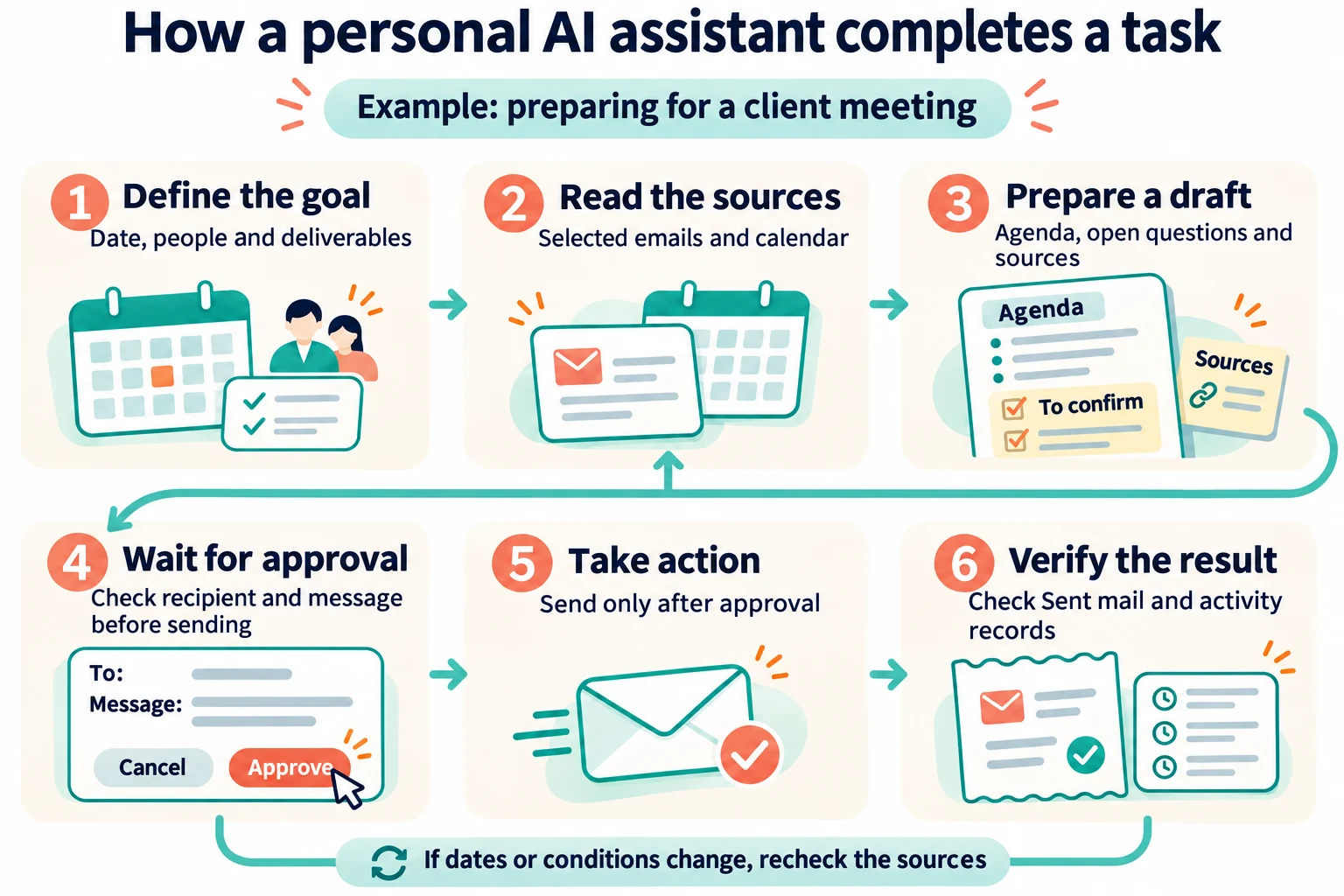
Compare assistants using the same small assignment. Preparing for a client meeting is a useful starting point because it has identifiable sources, a result you can check and a clear separation between reading and sending. The following test materials and instructions are something you can prepare yourself; they do not imply that all five services have passed this test.
Prepare information you can verify. Create a test calendar and a few emails containing an original meeting time, a reschedule and one missing deliverable. Use a fictional client and test accounts rather than connecting an entire company mailbox at the first attempt.
Define the output and authority. Specify the allowed sources and request a one-page briefing with source links and open questions. Record whether a product requires access to the whole account. Writing “read only these emails” in a prompt is different from enforcing that restriction in the permission system.
Review the draft first. Check the revised date, Taipei time zone, attendees and commitments. A missing attachment should be marked as missing, and a proposal nobody accepted must not become a commitment. If a correction is needed, identify the conflicting source and explain how to handle it.
Test execution and follow-up separately. Send only to your own test address. Approve after reviewing the recipient and message, then verify the Sent folder. Add a second rescheduling email and see whether the assistant updates the briefing. Also check that any schedule or background task needed for tracking remains active.
For your first assignment, adapt the date in this example prompt.
Using only the test emails and calendar I specify, prepare a briefing for the client meeting on December 2. Show times in Asia/Taipei. List the confirmed agenda, missing materials and decisions I need to make, with a source for each item. If sources disagree, list the conflicts first. Create only the briefing and a reply draft this time. Do not send email or change the calendar. When finished, tell me which sources you checked and what you could not confirm.
Record which steps each assistant completed, what it missed and how long you spent correcting it. If you must reread every email from scratch, it has saved little work. If it reliably identifies gaps and conflicts, it can already be useful even when you still press Send. These observations are a better basis for choosing a subscription than how pleasant one conversation felt.
How to bring a personal assistant into a company
A successful personal test shows that a task deserves further exploration. Department-wide use also requires different access rights for colleagues, revocation after someone leaves and clear authority for external actions. A manager’s ability to read a quotation does not mean a shared assistant should expose it in every colleague’s conversation.
These organizational questions are covered further in our guide to enterprise AI agent applications and deployment. Start by selecting a frequently repeated task whose result can be checked, run it once from beginning to end, and then decide which permissions need expanding.
What comes next
A useful direction for personal agents is to anticipate needs using the context a person has chosen to share. An assistant might combine a routine, a weather forecast and traffic conditions to suggest carrying an umbrella or leaving early. Such scenarios illustrate what proactive assistance could mean in everyday life.
Within a company, agents can also divide work across market analysis, product development and customer service. As with a professional team, each role needs a clear responsibility and a way to coordinate with the others.
To explore how AI can work with an enterprise knowledge base, the RAGi enterprise AI decision platform offers low-code and no-code interfaces for building workflows and agents around organizational knowledge. Contact us to discuss the task and data you want to work with.